Originally posted on June 27th, 2017. Reposting on November 17th, 2017 as the spreadsheet is now completely up to date. This is one of the best resource pages on this site, so big thanks to Don for keeping it updated. ~Will
Quick Summary
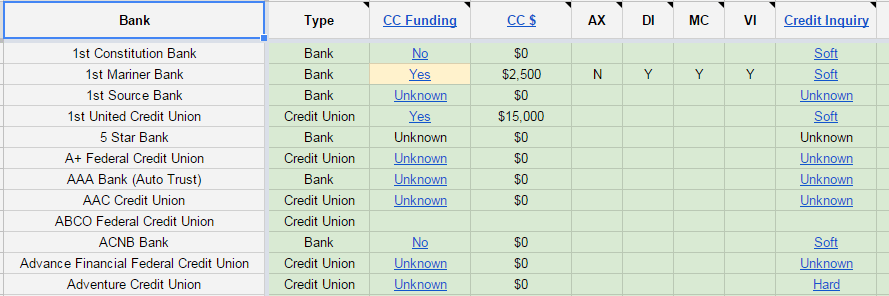
Bank Account Quick Reference Spreadsheet [Link to Google Spreadsheet]
This spreadsheet can be thought of as another way to view the big DoC Bank Knowledge Base.
Reposting due to updated information, added functionality.
Spreadsheet Value
Perhaps you evaluate bank deals as they show up in your RSS reader, or use (Google) search to find them.
A spreadsheet is a nice additional tool because it allows you to sort and filter on multiple dimensions. For example, you might want to see all active, local, soft pull bank bonuses of a certain size.
You can add your own personal filter views to the spreadsheet. The following are a few sample filter views already added:
Active Filters
| Filter | Notes |
| Post Last 30 Days | Bank Bonuses posted/updated within the last 30 days |
| Not Expired (with Date) | Unexpired Bank Bonuses (not including those with unknown expiration dates) |
Credit Card Funding Filters
| Filter | Notes |
| CC Funding (Sorted) | Sorted by potential credit card funding size |
| CC Funding – Amex | Amex CC is allowed on initial account funding |
| CC Funding – Soft – Michigan | Michigan Banks that do a soft pull and accept credit funding on initial deposit. |
| CC Funding – Soft – USA v2.0 | Banks/Credit Unions available nationally that do a soft pull and accept credit card funding. (A work in progress – national availability data is not complete) |
Some More Example Filters
| Filter | Notes |
| [Location Filter] Michigan | Local and Regional Banks with a presence in Michigan.
Every state has its own column. “*” indicate bonus available in only specific regions of the state. |
| [Bonus Size Filter] BB $250+ | Bank Bonuses greater than or equal to $250 |
| Hub Account Prospect | Hub Account options based on a number of dimensions |
More Details
Layout
Drill down from column headings or cells for more detail.
| Location | Description |
| Rows | One row per bank (financial institution) |
| Column Headings | Link to the consolidated bank resource page
(e.g. Is Opening a Bank Account a Soft or Hard Pull?) |
| Cells | Link to a position within the bank resource page
But may link directly to:
“*”s and colors attempt to highlight addition details or exceptions |
I would always recommend drilling down to the resource page:
- The spreadsheet may get out of sync with the source data (update times are shown in spreadsheet tab)
- You’ll get a sense of the quantity and quality of the data points supporting the determination
Warnings/Disclaimers
(In addition to all the standard disclaimers,) this resource is incomplete and filled with errors.
It is an attempt to summarize and categorize rules inferred from community data points.
Please share your data points and ideas to help improve the table.
Final Note
Big thanks to Will’s tireless effort to generate hundreds of bank bonus posts per year and the thousands of datapoints provided by the DoC Community.
All the best!