Contents
What Is Earn by Microsoft?
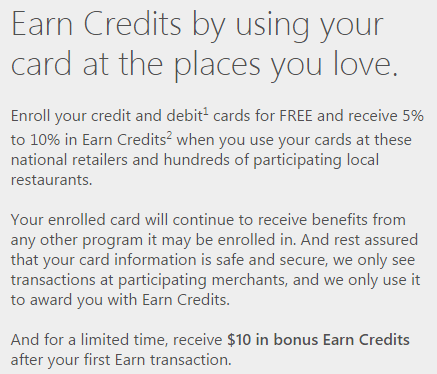
Earn is a new offering by Microsoft that is currently in open beta. It’s a coalition loyalty program (similar to American Express’ new Plenti program), which means that purchases you make at a variety of different retailers will earn the same loyalty points. The basic idea is that you link your debit and credit cards to Earn, then when you make purchases at participating merchants with those cards and then you’ll receive Earn credits.
At the moment only Visa & MasterCard cards can be added. They also have plans to allow users to be able to add American Express cards ‘very shortly’. There is no word on when Discover cards might be able to be added, if at all.
How Much Will You Earn?
The amount of earn credits that you’ll receive depends on the merchant, but there is a minimum of 5% and maximum of 10%. This is in addition to whatever credit card points (and loyalty points) your card normally earns. This means there is no downside in enrolling your cards (although there is a very limited risk of a security breach).
Note: Earning is currently restricted to Arizona, Massachusetts, and Washington
The amount you earned is based on the total amount charged on your card which is inclusive of tax, tip and shipping.
Current Partners
To begin with Earn has partnered with the following merchants:

Referral Program – $10 Free Sign Up
Earn also offers a referral program, for every person you sign up that makes at least one Earn transaction you’ll receive $5 and they’ll receive $10. You can post your referral link in the comments below, on one condition: you must provide something of value in addition to your referral link. If you don’t provide anything of value in your comment, I’ll simply remove your link.
Redeeming Earn Credits
Your Earn Credits can only be redeemed at local Microsoft stores and currently only in Arizona, Massachusetts, and Washington. Presumably you’ll also be able to redeem them online and in other states at some point in the future as well.
To use your credits you simply need to use the card that is enrolled in Earn by Microsoft to make a purchase at your local Microsoft store. 100% of your Earn balance will be applied to the purchase and will show as a statement credit on your card statement.
Limitations
There are a number of limitations to Earn which make it not as good as it looks at first glance. I’ve included them below:
- People have reported receiving warning e-mails about purchasing cash equivalents (e.g Visa gift cards) using enrolled cards.
What is interesting about the above is that the fine print states:
Microsoft reserves the right not to provide or to reverse Earn Credits for purchases of prepaid debit cards, money orders, gift cards, cash equivalents, and for items that are returned
Yet people have been earning Earn Credits on these purchases, but they were simply warned not to do it again. It would’ve made more sense to just disallow the points that were earned instead.
- You’re limited to earning $2,000 in Earn credits per calendar year
- Points expire one year after they’ve been earned (first in, first out)
- Card’s cannot be enrolled in Rewards Network and this program. If they are enrolled with Rewards Network you won’t earn Earn credits.
- Transactions where a PIN is entered do not earn points. This seems particularly limited given the impending liability shift in October (although this is just for EMV cards, so not a lot of merchants will require PIN – but it will be a gradual process over the coming years).
- Earn credits can only currently be redeemed at Microsoft stores in Arizona, Massachusetts, and Washington
Final Thoughts
Not being able to earn points on gift card purchases is a real downer, especially if it’s being enforced. That being said if you make regular every day purchases at these merchants and don’t participate in the Rewards Network, then this is a good option for you to get an additional 5-10% in Microsoft credit back on those purchases. It’s also kind of annoying that there is a $2,000 calendar year limit and points expire after one year, although that means you could have $4,000 in your account at one time which should be more than enough for even the largest Microsoft purchase.
I like this program a lot more than the American Express offering, the earning rates are much higher and there is less fluff. Being limited to local Microsoft stores is a bit limiting, but they’ve also partnered with places I actually shop at rather than Plenti’s partners.
Hat tip to View From The Wing via Miles Per Day